Apex PDF Protect2.3.8.2
Publisher Description
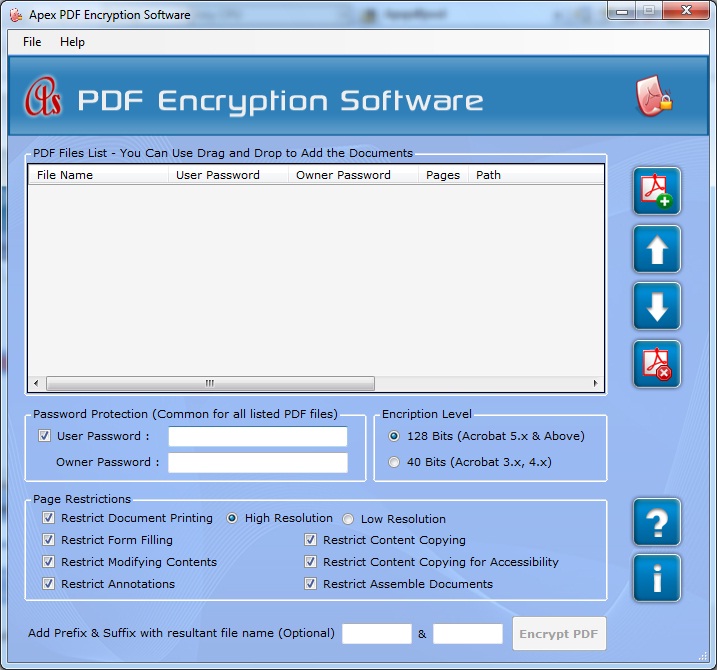
PDF protect software is standalone with its advance & specific user interface which encrypt, add, set and lock password & restrictions on Adobe PDF documents. PDF documents locker tool restrict you of PDF printing, contents editing, copying of data to clipboard, documents assembling, PDF annotations, form filling or content copying. Encrypt, add, restrict, protect or allow PDF page restrictions on the Adobe PDF documents. PDF password restrictor set permissions on the PDF documents using standard 40 bit & 128 bit RC4 and AES encryption level. To making PDF more secure, user can encrypt user & owner password on the PDF files. Lock multiple PDF files by encrypting password parameters on the PDF documents. Restrict PDF using restrictions on copy PDF contents, editing, printing, filling forms, extracting PDF text and modifying content instantly. PDF encryption utility set unique name on the PDF documents using Prefix Suffix. This software instantly runs on all latest Windows operating system like Win2000, Win7 x32, Win7 x64, Win98, Win Vista, Win Vista x64, and Win XP.
Features:
* Add, encrypt or allow PDF protections from batch PDF documents.
* Software is standalone does not require Adobe Acrobat Reader.
* Restrict PDF content using security and password on the Adobe PDF files.
* Use RC4 and AES encryption algorithms as PDF password encryptions.
* Strongly encrypted with 128 bits and 40 bits password.
* Its Specific GUI support new users directly.
* Provides high and low resolution of PDF protections.
* Protect documents assembling, modifying contents, editing contents, PDF annotations or page extractions.
* Application can encrypt user and owner password protection on selected documents.
* Set unique name on the PDF files using Prefix Suffix.
* Works with all latest Windows OS such as Win2000, Win7 x32, Win7 x64, Win Vista, Win Vista x64, and Win XP.
About Apex PDF Protect
This Encryption Tools program is available in English. It was last updated on 29 September, 2026. Apex PDF Protect is compatible with the following operating systems: Other, Windows.
The company that develops Apex PDF Protect is PDF Protect. The latest version released by its developer is 2.3.8.2. This version was rated by 8 users of our site and has an average rating of 3.0.
The download we have available for Apex PDF Protect has a file size of 3.1 MB. Just click the green Download button above to start the downloading process. The program is listed on our website since 2014-12-03 and was downloaded 391 times. We have already checked if the download link is safe, however for your own protection we recommend that you scan the downloaded software with your antivirus. Your antivirus may detect the Apex PDF Protect as malware if the download link is broken.
How to install Apex PDF Protect on your Windows device:
- Click on the Download button on our website. This will start the download from the website of the developer.
- Once the Apex PDF Protect is downloaded click on it to start the setup process (assuming you are on a desktop computer).
- When the installation is finished you should be able to see and run the program.
Program Details
System requirements
Download information
Pricing
Version History
version 2.3.8.2
posted on 2014-12-03
Adding new features to encrypt add PDF password security and set document restrictions
version 2.3.8.2
posted on 2011-08-08
Adding new features to add or remove password protection of PDF file.
